Notiz Randevu
From first enquiry to appointment
When someone calls or messages on WhatsApp, your team needs to know who can see them and when. Choose a time, record how they found you and keep track of whether they attended.
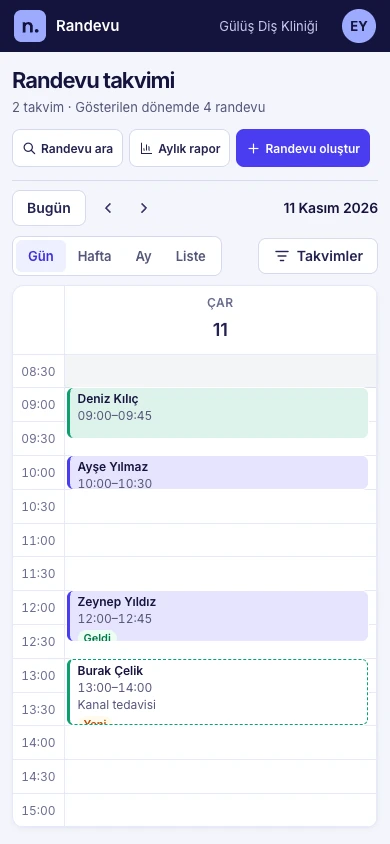
Find an opening this week
Choose the day, week, month or list view and filter by practitioner. When plans change, move the appointment to its new time.
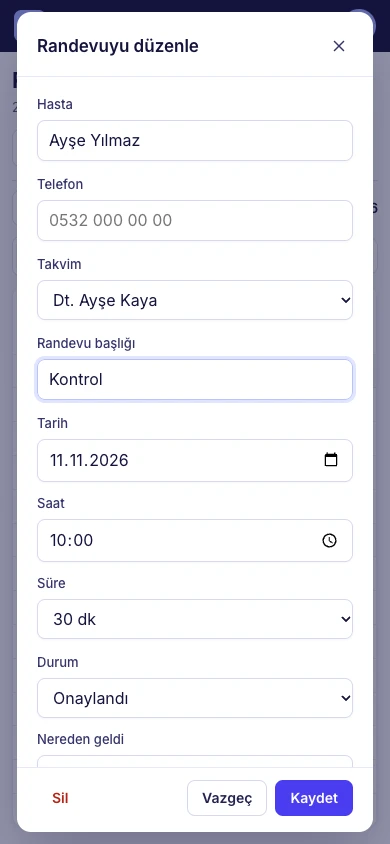
Turn an enquiry into a booking
Choose the customer, time and calendar. If the enquiry came through WhatsApp, record it as the source. You will see a warning before saving a booking that overlaps another one.
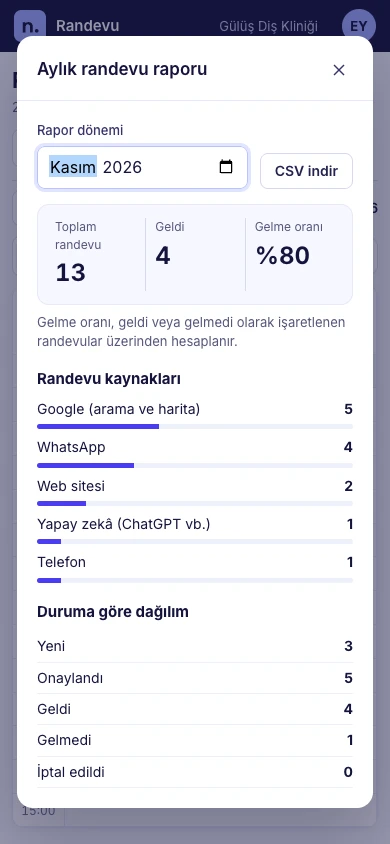
See where bookings came from
Select a month to review the sources and outcomes your team recorded. Download the report as a CSV for your next review.
Where will bookings be recorded?
- Google Calendar
- You can also sync your Notiz calendar with a dedicated secondary Google calendar. Start times, durations and cancellations update both ways. Guest, recurring and all-day events are outside the sync.
- WhatsApp reminders
- Reminders need the recipient’s permission and a Meta-approved template. For bookings in your existing software, the owner can enable reminders separately if the provider supplies upcoming bookings and a current record. Notiz rechecks the time, number and status before sending.
Let’s look at your business
Tell us your district and sector. On our first call we’ll discuss how people find you today, where bookings fall through and whether we can work together.
Both fields are optional. You can edit the message in WhatsApp before sending it.